In Genie’s Safe-T-Beam chart, a red source LED that blinks twice with the green LED on points to alignment, obstruction or a defective sensor. Two red blinks with the green LED off points toward missing/bad sensor wiring or a defective sensor.
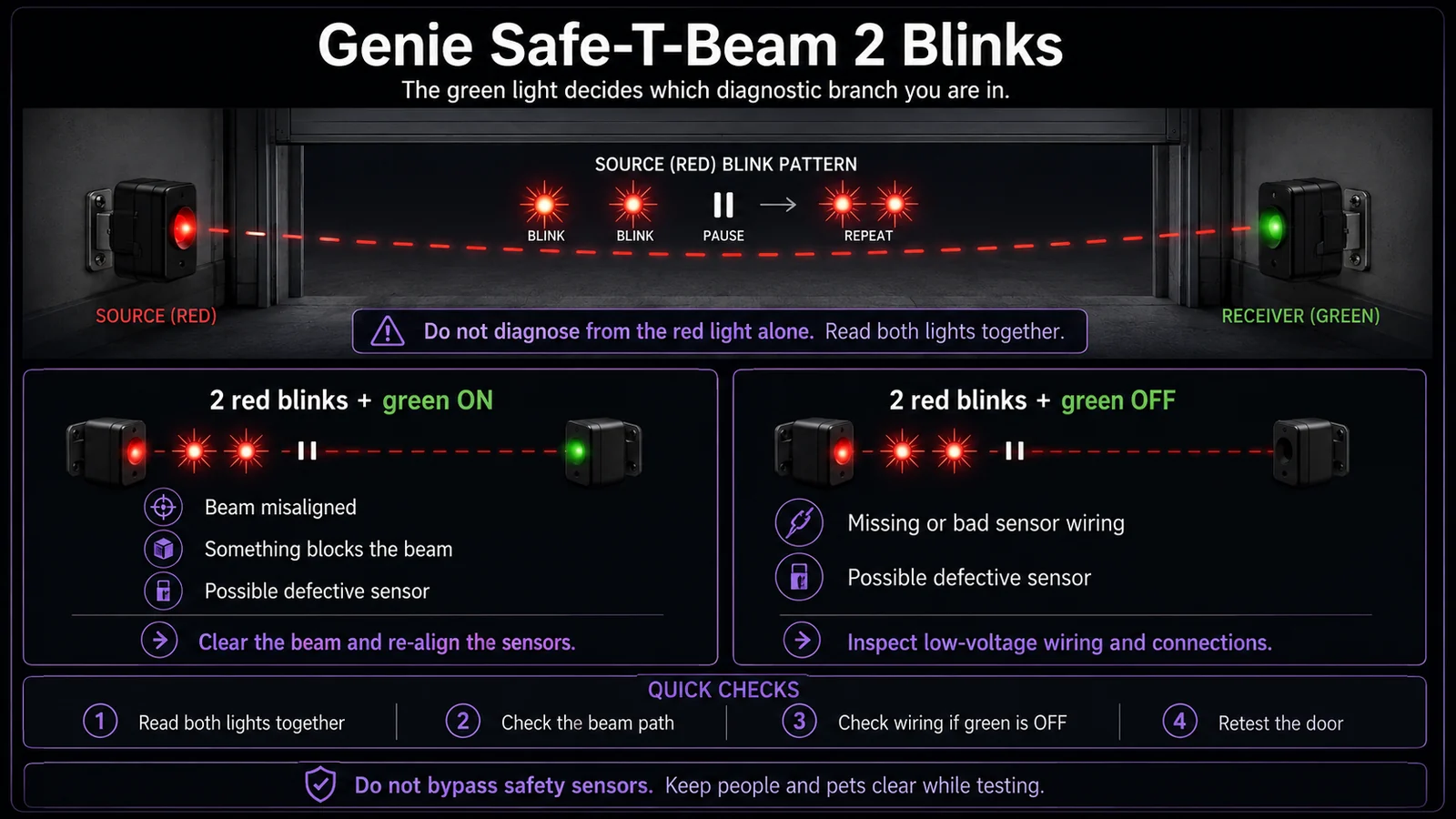
Read Genie Safe-T-Beam red and green LEDs together
What is each Safe-T-Beam eye reporting at the same time?
Record both LED states before choosing a blink-code branch.
Genie identifies the red LED unit as the source/transmitter and the green LED unit as the receiver. A blink count is not enough by itself: several diagnostic branches change depending on whether the other LED is steady, off or also abnormal.
This exact manufacturer signal can feed the following diagnostic families. Keep the original code or LED pattern when troubleshooting.
What you are likely to notice
- Red LED blinks twice, pauses and repeats
- Green LED status changes the diagnostic branch
- Door may stop and reverse during closing
Check these in order
1. Note whether green is ON or OFF
Do not troubleshoot from the red LED alone. Genie’s diagnostic table changes the likely cause based on the green sensor state.
2. If green is ON
Check beam alignment, beam obstruction and sensor condition. Re-aim the lenses and remove anything crossing the opening.
3. If green is OFF
Inspect the wire to the sensor for missing, loose or damaged connections before assuming the sensor itself failed.
4. Confirm normal operation after correction
Both Safe-T-Beam units should return to their normal steady state and the door should complete the manufacturer’s safety reversal test.
The green LED is what makes the two-blink code useful
Two red blinks are not one single fault. Genie’s chart splits the diagnosis by the green LED. With green on, the likely branch is beam alignment, an obstruction or sensor failure. With green off, the chart moves toward missing or bad wiring to the sensor or a sensor fault. That one observation can save an unnecessary parts swap.
Before touching anything, watch a complete blink-pause-repeat cycle and confirm the green LED state. With the door stopped, if the pattern changes while you make a small adjustment using only the sensor bracket, alignment is more plausible. If the companion sensor remains dark, wiring deserves more attention.
Avoid the ‘replace both eyes’ shortcut
Replacement may eventually be correct, but the two-blink pattern gives you a structured way to rule out simpler causes first. Clear the beam, clean both lenses, inspect bracket position and examine the accessible low-voltage wire. A freshly installed sensor can still fail if the wiring is loose or damaged upstream.
After the correction, do not stop at seeing steady LEDs. Cycle the opener and perform the manufacturer’s Safe-T-Beam test so you know the system reacts correctly to an interrupted beam.
The green LED decides which 2-blink branch you are in
Genie's Safe-T-Beam chart does not treat every two-blink pattern the same. Two red blinks with the green LED ON points to beam alignment, an obstruction or a defective sensor. Two red blinks with the green LED OFF instead points more strongly toward missing/bad wiring to the sensor or a defective sensor. Record both lights together; writing down only '2 blinks' throws away the information that separates these branches.
Before replacing a sensor, remove obvious beam obstructions and verify the pair is mounted in the Safe-T-Beam zone near the floor. If the green state changes when wiring or the sensor position changes, preserve that observation. The goal is not to make the lights look normal for one cycle—it is to identify whether the failure follows alignment, wiring or the sensor itself.
- 2 red blinks + green ON: alignment/obstruction/sensor branch.
- 2 red blinks + green OFF: wiring-to-sensor/sensor branch.
- Do not combine the two states in notes or a service request; the green LED is part of the code.
If the two-blink condition survives the first checks, capture a short note or video showing the red repeat pattern and the green LED state in the same frame. Add whether the beam is visibly clear and whether the wiring has been disturbed recently. Those details preserve the exact Genie branch instead of reducing the report to a generic 'sensor problem.'
Stop DIY troubleshooting when…
- The wiring is damaged beyond a simple accessible repair
- The sensor housing is physically broken
- The door itself binds or falls
Garage door springs, cables and a falling/unbalanced door can store or release dangerous force. Those are door-system problems, not just opener settings.
Common questions
What if red blinks twice and green is on?
Genie lists misalignment, beam obstruction or a defective sensor as the likely branch.
What if red blinks twice and green is off?
Genie lists missing/bad sensor wiring or a defective sensor as the likely branch.
Does two blinks mean the opener motor is bad?
The Safe-T-Beam diagnostic chart points to the sensor/beam/wiring branch, not directly to the opener motor.
Manufacturer sources used
These links are the factual baseline for the diagnostic claims above. Model-specific manuals can supersede general guidance.